What is the color sensor?
The Color Sensor distinguishes between eight different colors. It also serves as a light sensor by detecting light intensities. We can use this sensor to help with color sorting and line-following robots. For the sake of this bootcamp, we will use a more simple example.
We will have the robot say blue when it drives over a blue surface.
In order to do this, we must begin with a Tank Move block.
However, this block must have the output set to On rather than On for Rotations (Blue Circle). This will allow us to not restrict our drive. As you will notice, now there is no option to choose the number of Rotations. The robot will keep moving continuously until it is told to stop.
This robot will be told to stop running the move block by a Wait block which will interrupt the move block when the condition is met, and will move to the next block in the code sequence.
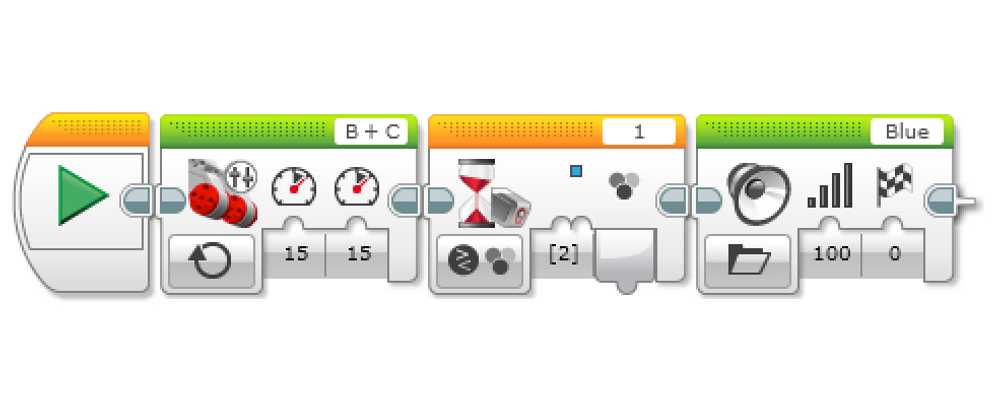
For this program, we need to understand the Wait block. The Wait block waits until a certain condition is met.
The previous block will continue to be run until the wait condition is met. In this case, we will choose the condition to be the color detected by the color sensor. To do this, we will select the condition as Color-Sensor → Compare → Color. Then, choose the color that we want to detect for (Blue Circle).
After this, we will place a Sound Block that emits a pre-built sound saying “Blue!”
For the Sound Block, set the lower left Input block to files, rather than images. Then, choose the file by clicking the box on the top right. Choose LEGO Sound Files → Colors → Blue.