Font Size
The font-size property is used to change text size. Size can be specified absolutely in pixels, or relative to the default font size using the em unit.
h1 {
    font-size: 10px;
}
p {
    font-size: 2em;
}
Font Weight
Font weight changes how bold the text appears. You can specify the font weight with words ("normal", "bold", "bolder", "lighter") or numerically (100, 200, 300, 400, 500, 600, 700, 800, 900). 400 is generally the "normal" weight of a font.
h1 {
    font-weight: 200;
}

p {
    font-weight: bold;
}
Font Family
To change the typeface of a piece of text, set the font-family property to the name of the font. In addition to your first choice font, you should also add backup fonts. They will be used if the first choice can't be shown (for example, if the user's browser doesn't support it).
p {
    font-family: "Courier New", sans-serif;
}
A great tool you can use to add new fonts is Google Fonts. To add one of the fonts to your document, first find the font and click on it, then click "+Select this style" for every font style you plan to use.
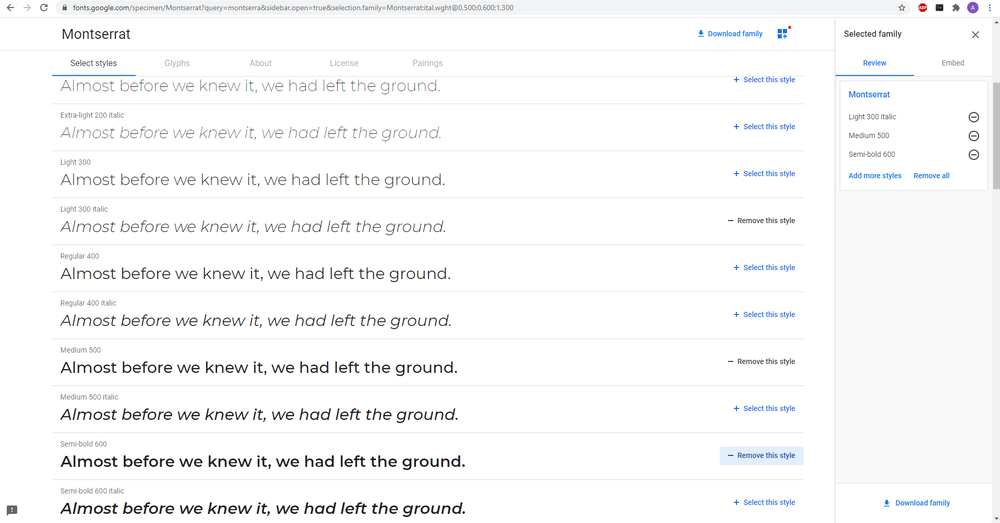
Then, click "Embed" in the right menu, and copy the link.
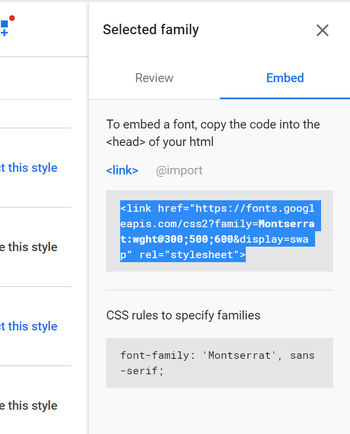
Paste the link into the head of your HTML document, and now you can use this font in your CSS by its name.