For this project, you'll be making your own pizza order form from scratch.
Make sure to include these kinds of input:
- single-line text
- radio buttons
- checkboxes
- dropdown menu
- textarea
- submit button
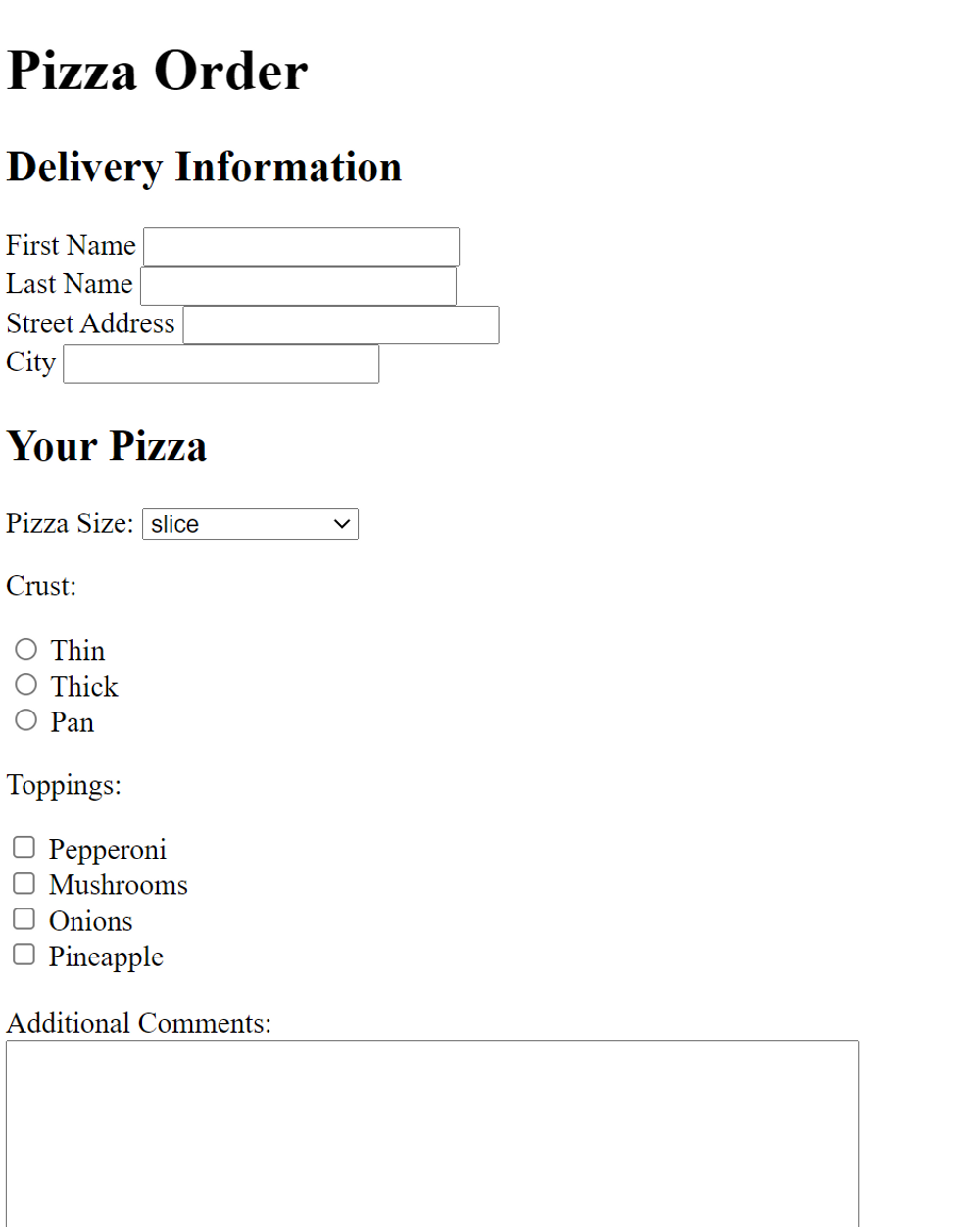
Here's an example:
HTML · Chapter 4: Forms
Make your own form using what you just learned
For this project, you'll be making your own pizza order form from scratch.
Make sure to include these kinds of input:
Here's an example:
If you're stuck on any of these, you can go back to some of the earlier lessons for help!
    <form action="example.html" method="POST">
        <h1>Pizza Order</h1>

        <h2>Delivery Information</h2>

        <label for="fname">First Name</label>
        <input type="text" id="fname" name="first-name">
        <br>
        <label for="lname">Last Name</label>
        <input type="text" id="lname" name="last-name">
        <br>

        <label for="street">Street Address</label>
        <input type="text" id="street" name="street-address">
        <br>
        <label for="city">City</label>
        <input type="text" id="city" name="city">

        <h2>Your Pizza</h2>

        <label for="size">Pizza Size:</label>
        <select id="size" name="size">
            <option value="slice">slice</option>
            <option value="small">small (10")</option>
            <option value="medium">medium (12")</option>
            <option value="large">large (14")</option>
            <option value="extra large">extra large (16")</option>
        </select>

        <p>Crust:</p>
        <input type="radio" id="thin" name="crust" value="thin">
        <label for="thin">Thin</label><br>
        <input type="radio" id="thick" name="crust" value="thick">
        <label for="thick">Thick</label><br>
        <input type="radio" id="pan" name="crust" value="pan">
        <label for="pan">Pan</label>

        <p>Toppings:</p>
        <input id="pepperoni" name="topping" type="checkbox" value="pepperoni">
        <label for="pepperoni">Pepperoni</label>
        <br>
        <input id="mushrooms" name="topping" type="checkbox" value="mushrooms">
        <label for="mushrooms">Mushrooms</label>
        <br>
        <input id="onions" name="topping" type="checkbox" value="onions">
        <label for="onions">Onions</label>
        <br>
        <input id="pineapple" name="topping" type="checkbox" value="pineapple">
        <label for="pineapple">Pineapple</label>

        <br><br>
        <label for="comment">Additional Comments:</label>
        <br>
        <textarea id="comment" name="comment" rows="8" cols="60"></textarea>
    </form>
Give the project a try first.